Smart Search Moodle Plugin2026-07-07T10:49:48+05:30

Newly Launched

Make Moodle™ Search Faster, and Easier to Use

Give administrators, and teachers a quick way to find courses, activities, users, settings, categories, and admin pages without digging through menus.

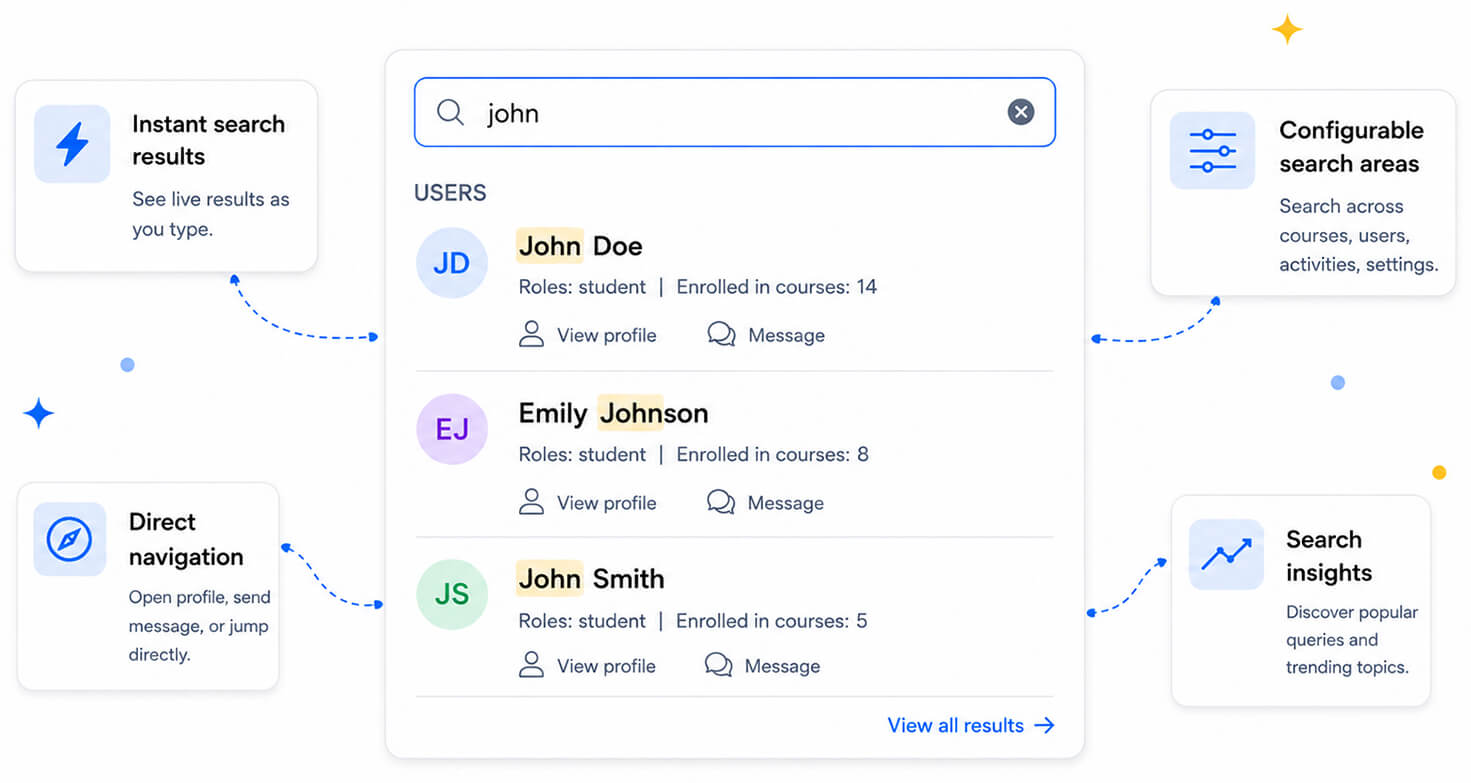
Smart Search Moodle plugin showing instant user search results with direct navigation, configurable search areas, and search insights

Why Smart Search Feels Better

A faster, more intuitive way to find courses, activities, users, settings, and admin pages across your Moodle site.

Find Things While You Type

Smart Search shows results instantly as the user starts typing. This makes it easier to spot the right course, activity, user, or setting without leaving the current page.

Open Results Directly

When the right result appears, users can open it right from the header. This reduces unnecessary clicks and makes common admin and teaching workflows faster.

Keep Results Relevant

Search categories can be enabled or disabled. This helps prevent clutter and keeps results focused on the areas that matter most to your site.

Understand What People Search For

Optional search insights help administrators see what users are trying to find. This can reveal common navigation patterns, frequently searched items, and areas where course organization may need improvement.

Designed for Daily Moodle Workflows

Built to support the people who use Moodle most, from administrators and teachers to teams managing larger sites.


Smart Search helping a Moodle administrator find users, authentication settings, plugin settings, and courses faster.

For Administrators

Jump to users, courses, plugin pages, site settings, and admin areas faster. Smart Search is especially useful when managing large Moodle sites with many courses, users, and configuration pages.

Smart Search helping a Moodle teacher find certificates, quizzes, resources, and course activities quickly.

For Teachers

Find course activities, resources, and course areas quickly while building or managing content. This helps teachers spend less time browsing and more time working on the course.

Smart Search helping a team search across courses, activities, categories, and settings on a larger Moodle site.

For Larger Moodle Sites

Make the LMS easier to navigate as your site grows. Smart Search helps reduce friction when there are many courses, categories, users, activities, and settings to manage.

The Smart Search is free and open source.

Smart Search can be installed like a Moodle plugin. After installation, administrators can enable the plugin, configure searchable areas, and start using the improved search experience across the site.

Learn More About Moodle Search and Navigation

A deeper look at the thinking behind Smart Search, from the navigation challenges that appear as Moodle sites grow to why we built a faster, cleaner replacement for Moodle Global Search focused on instant results, direct access, and everyday LMS productivity.

BLOG POST

Search Across Your Entire Moodle Site in Seconds

As your Moodle site grows, finding the right item takes more effort. Courses, activities, users, settings, plugin pages, categories, and reports all become harder to reach quickly. Smart Search turns Moodle search into a fast navigation layer, helping administrators and teachers find and open what they need with fewer clicks.

BLOG POST

Smart Search vs Moodle Global Search

Moodle already has useful search options, but not every search need is the same. This post compares Moodle Global Search, Site administration search, and Smart Search to show how a faster, grouped, permission-aware search experience can help administrators and students.

Frequently Asked Questions

Have questions? See the list below for commonly asked questions. If your question is not listed here, then please contact us.

How does Smart Search work with Moodle Global Search?2026-07-02T16:48:35+05:30

Smart Search provides an alternative search experience for Moodle sites that want faster dropdown results and direct navigation. When Smart Search is enabled, the site search experience is handled through Smart Search, giving users a more streamlined way to find courses, activities, users, settings, and other enabled areas.

What can Smart Search search?2026-07-02T16:49:15+05:30

Smart Search can search enabled areas such as courses, activities, users, categories, site settings, admin pages, plugin pages, and email addresses where permissions allow.

Can administrators control the search results?2026-07-02T16:49:41+05:30

Yes. Administrators can choose which categories are included, helping keep search results relevant to the site.

Does Smart Search include analytics?2026-07-02T16:53:13+05:30

Smart Search includes optional search activity insights. These can help administrators understand what users search for most often.

Go to Top