
Course Completion Page for Moodle | MooPlugins2026-09-22T18:17:52+05:30

Course Completion Page for Moodle

Give Students a clear end to every course

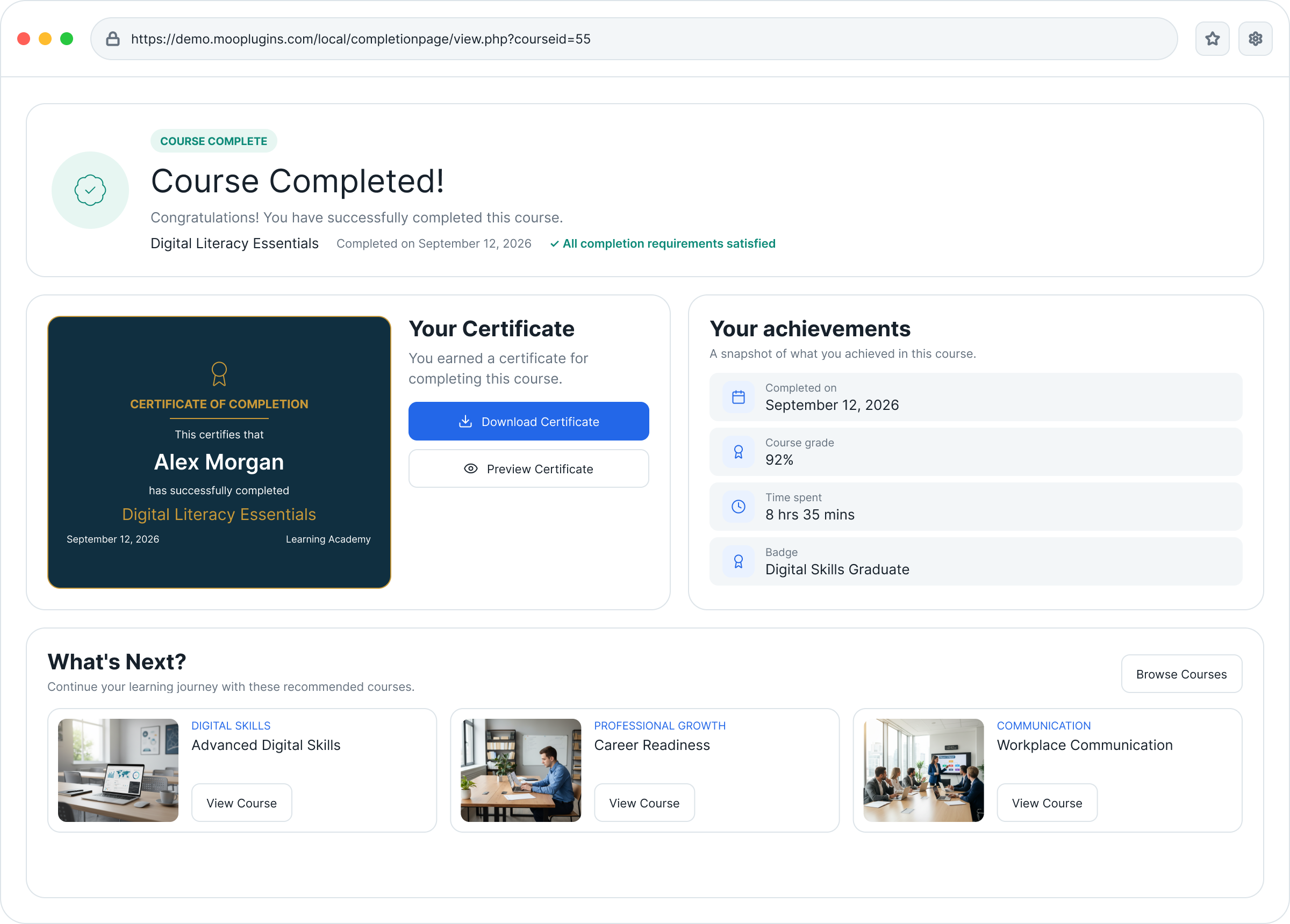
Course completion should feel like an achievement, not just the end of the last activity. Course Completion Page gives Students a dedicated post-course experience where they can see what they achieved, access their certificate, share feedback, and understand what to do next.
  • Free Moodle plugin
  • Moodle 4.5+
Smart Search Moodle plugin showing instant user search results with direct navigation, configurable search areas, and search insights

Everything Students need at course completion

Celebrate achievement and guide the next step

Once Students satisfy the course completion requirements, the learning journey can end abruptly. Course Completion Page adds the missing final step: a clear moment of completion, followed by useful information and guidance on what comes next.

Completion message

Show a clear course-completion message with the course name and completion date. Teachers can customize the headline and message for individual courses.

Certificates

Let Students preview and download an issued certificate directly from the completion page. Currently supports Custom certificate.

Achievements

Show useful course information such as Course grade, Completion date, Time spent, and Earned badges. Only available information is displayed.

Feedback

Link Students directly to a selected Moodle Feedback activity at the point when their course experience is still fresh.

Suggested courses

Recommend the next courses Students should take. Teachers can manually select courses, or the plugin can automatically show up to three visible courses from the same category.

Next-step actions

Keep Students moving through the platform with clear options such as Go to Dashboard, My courses, and Browse courses.

Site-wide defaults

Administrators can define the default completion-page experience for the whole site. Teachers can use those defaults or override individual settings for their own courses.

Clean, adaptive display

If a certificate, grade, badge, feedback activity, or suggested course is unavailable, the plugin simply leaves it out. No empty sections or irrelevant information.

Flexible configuration

Set defaults once. Customize where needed.

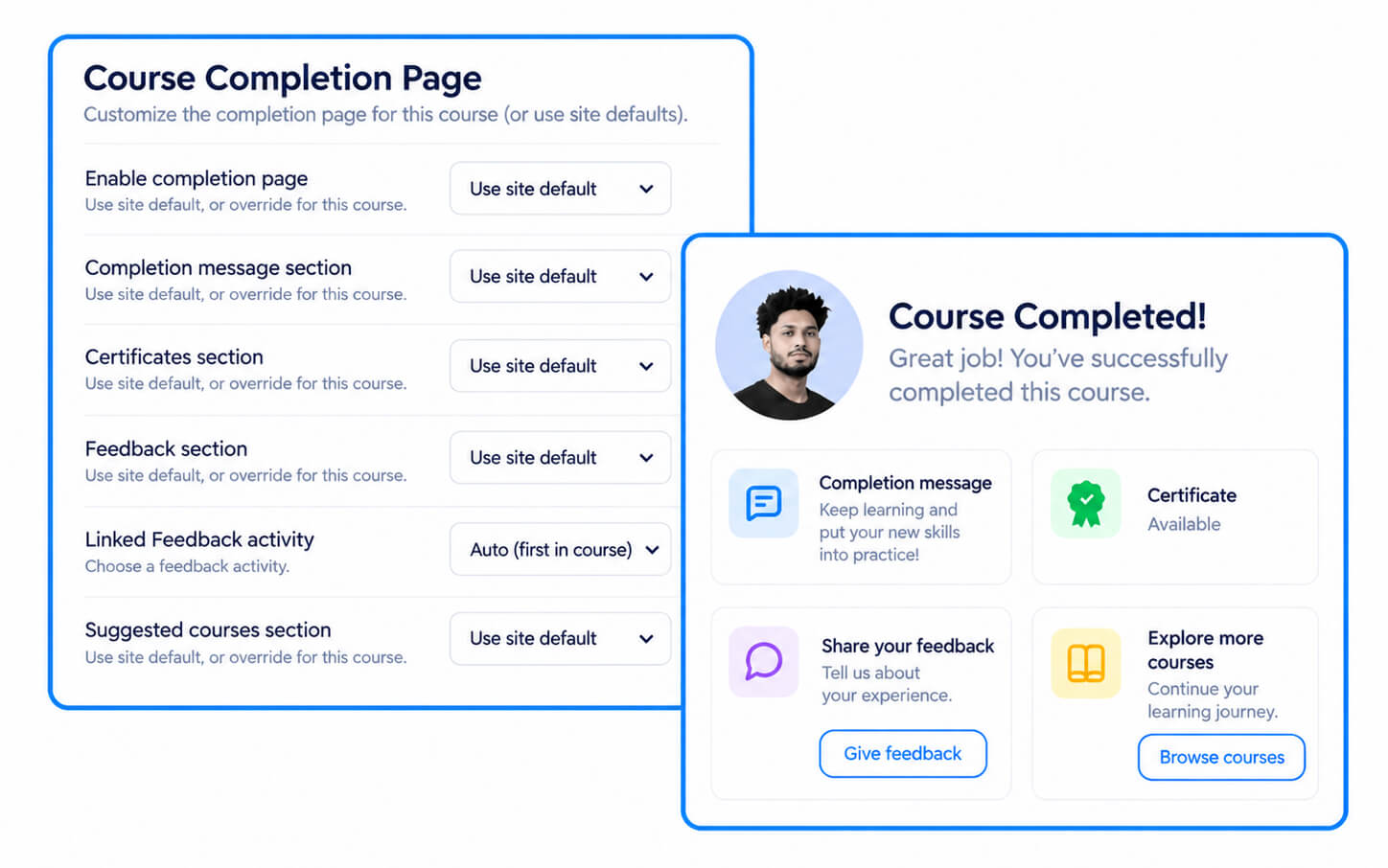
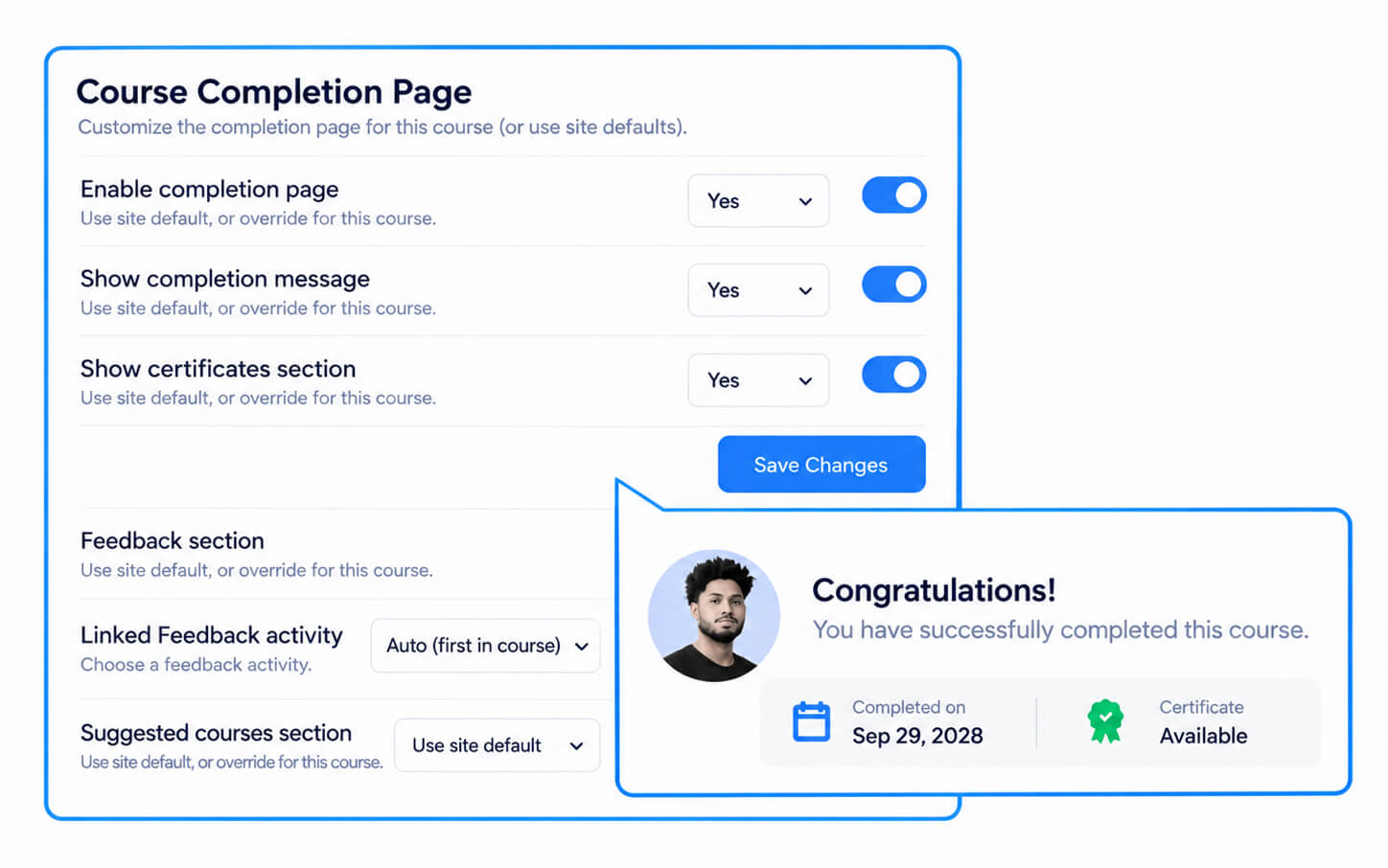
Define the default Course Completion Page experience at the site level, then let Teachers adjust individual courses when needed.
For Administrators

Administrators can control the site-wide defaults for the completion message, certificates, feedback, suggested courses, achievements, exit options, and time spent source.

These defaults provide a consistent starting point across courses.

Course-level Course Completion Page settings in Moodle showing per-course overrides for completion messages, certificates, feedback, and suggested courses

For Teachers

Teachers can use the site defaults or override individual Course Completion Page settings for a specific course.

They can customize the completion message, select a Moodle Feedback activity, choose suggested courses, and enable or disable individual sections as needed.

How it works

Once Moodle confirms that a Student has completed the course, Course Completion Page provides a clear final step where they can review their achievement and see what to do next.

Ready to try?

Give every course a better ending

Create a clear final step that celebrates completion, shows achievements, and guides Students toward what comes next.

Guides for Better Course Completion in Moodle

Practical guides on creating a clearer end-of-course experience, recognizing Student achievement, collecting feedback, and guiding what comes next.

BLOG POST

How to Create a Better Course Completion Experience in Moodle

Moodle can mark a course complete, but the Student experience can still end abruptly. This guide looks at how to create a clearer final step with achievements, certificates, feedback, and useful next actions.

BLOG POST

Course Completion in Moodle: When You Need It and When You Don’t

Course completion is valuable when a course has a meaningful finish point, but not every Moodle course needs one. See where completion tracking makes sense across compliance, onboarding, certification, academic, and self-paced learning.

Frequently Asked Questions

Have questions? See the list below for commonly asked questions. If your question is not listed here, then please contact us.

Does Course Completion Page change how Moodle determines course completion?2026-09-12T13:17:53+05:30

No. Moodle’s existing course completion rules remain the source of truth. The completion page is shown only after Moodle has marked the course as complete.

Can Teachers customize the completion page for individual courses?2026-09-12T13:18:21+05:30

Yes. Administrators can define site-wide defaults, while Teachers can use those defaults or override individual sections for a specific course.

What information can be shown on the completion page?2026-09-12T13:18:52+05:30

Depending on what is available, the page can show the completion message, completion date, course grade, time spent, earned badges, certificate, feedback option, suggested courses, and next-step actions.

If a particular item is unavailable, it is simply not shown.

Does the plugin support course certificates?2026-09-12T13:19:28+05:30

Yes. Course Completion Page currently supports Custom certificate (mod_customcert). If a certificate has been issued, Students can preview or download it from the completion page.

How does feedback work?2026-09-12T13:20:03+05:30

Teachers can link a Moodle Feedback activity to the completion page. Students are then directed to that activity to submit their feedback using Moodle’s normal Feedback workflow.

How are suggested courses selected?2026-09-12T13:20:32+05:30

Teachers can manually select courses to recommend. If no courses are selected, the plugin can automatically show up to three visible courses from the same course category.

Go to Top